Online visibility
The visibility of your content online is a key point not to be overlooked if you want to build your audience or, more humbly, share your thoughts. Pureblog has been designed from the ground up to allow the best ranking of your content on search engines (Google, Bing, etc.) and on LLMs (ChatGPT, Claude, Gemini, etc.).
This page explains the features built into Pureblog that improve the visibility of your content.
Core Web Vitals (back to the basics)
Core Web Vitals are Google metrics that evaluate the real user experience of a website through loading speed (LCP), responsiveness (INP) and visual stability (CLS). They are essential for SEO (Search Engine Optimization, i.e. ranking factors); they target specific thresholds, namely an LCP ≤ 2.5 s, an INP ≤ 200 ms and a CLS ≤ 0.1, analysed in the Google Search Console.
The 3 Core Web Vitals are:
- Loading speed or LCP (Largest Contentful Paint): This measures the time needed to display the largest visible element (image, text block) on screen. A good LCP is less than or equal to 2.5 seconds.
- Interaction responsiveness or INP (Interaction to Next Paint): This measures the latency of all user interactions (clicks, taps). The measurement is based on the worst interaction. It replaces FID (First Input Delay) as of March 2024, with a target of 200 milliseconds or less.
- Visual stability or CLS (Cumulative Layout Shift): This measures unexpected layout shifts. The score must be less than or equal to 0.1 to ensure stable navigation.
These elements are addressed by Pureblog in two ways:
- The whole of your Pureblog is static HTML. That is, it is built during generation. Pages are lightweight and require no post-processing in the visitor's browser. This means that LCP and INP remain extremely low even with a lot of content.
- All pages share a single format based on a template under your control. The template ensures consistency across your Pureblog, while remaining customisable (see also how to customise the design of your Pureblog).
TODO ADD A SCREENSHOT OF THIS SITE'S CORE VITALS ONCE PUBLISHED
Key SEO elements
All key SEO elements are handled by Pureblog.
When you look closely at a Google search result, you find the following key elements:
- The site title
- The icon (favicon)
- The URL
- The page title
- The page description
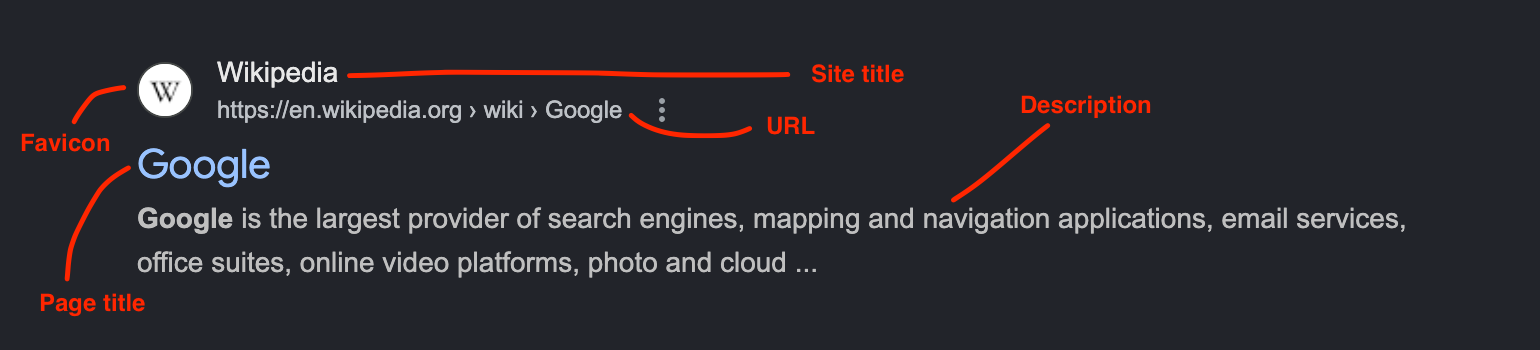
The site title is set in the configuration file (config/config.yml) with the general.site_title parameter.
The site icon (favicon) is generated automatically by Pureblog from a single emoji defined in the theme.favicon_emoji parameter of the configuration file (e.g. 📝). Pureblog produces an SVG file accessible at /favicon.svg and references it on every page of the site, with no external graphical resource required.
The URL is defined by the page slug and the language code. The slug is derived from the Markdown file name. The slug is important for SEO.
The page title and description are defined in the post front matter with the title and excerpt tags respectively.
Each blog post has a description (excerpt in the front matter of your post). This description is generated automatically using the first 200 characters of your post if it is not set. The description is used in the meta tag of your post pages (<meta name="description" content="..."/>).
Separation between title and URL
Many blogs use the page title as the URL. We think that's a bad idea. Indeed, the page title may contain "stop" words (such as "the", "an", etc.). The URL does not need those "stop" words. The URL should be as short as possible and contain keywords useful for SEO. Furthermore, a change in the page title to fix a typo should not break URLs already referenced on other sites or in search engines.
That is why the page title and the URL are two distinct concepts in Pureblog.
The page title (which appears on the page and is visible to visitors) is set in the front matter of the post (under the title tag). It is also that title which is used to build the indexes listing all the pages of the site.
The URL, on the other hand, is built from the post filename. The filename has the form <id>-<slug>.<lang>.md. The id identifier links together the same page written in different languages. The slug is the URL that will be used. The language is the 2-character ISO code (lang).
So a file named 002-write-new-post.en.md will be served at the URL /en/write-new-post/.
The sitemap
A sitemap is an XML file that lists the essential pages, videos and files of a website for search engines. It acts as a map, helping crawlers discover and index content efficiently, especially for new sites or complex structures.
For a blog, it also helps ensure that all pages are indexed, including those no longer on the front page of the site (on a 2nd or 3rd page, for example).
Why is the sitemap important?
- Fast and complete indexing: It allows Google and other engines to quickly find all pages, even those poorly interconnected (weak internal linking).
- Updates signalled: It tells crawlers the last modification date of pages, prompting them to come back and refresh the index.
- SEO optimisation: It helps better convey the structure of the site and index specific contents (videos, images, news).
- Required for some sites: Crucial for large sites, recent sites with few external links, or those using rich content (video).
Pureblog automatically generates a sitemap file for your entire Pureblog, taking translations and language availability into account. For each page, the last modification date (<lastmod>) is taken from the post date; for index pages, the date used is the date of the most recent post in the relevant language.
The sitemap file is available at the URL https://www.example.com/sitemap.xml and it is referenced automatically in the robots.txt to make it easier to discover by crawlers (search engines and LLMs).
Example sitemap for this Pureblog: https://www.pureblog.dev/sitemap.xml.
RSS feeds
The RSS feed (Really Simple Syndication) is an XML file format used to syndicate and automatically distribute frequently updated web content (articles, news, podcasts). It allows users to subscribe to their favourite sites and receive new updates without having to visit each site individually.
Users can read the latest publications as summaries or full text via dedicated readers such as Feedly, Inoreader or browser extensions.
Pureblog provides one RSS feed per language. RSS feeds are generated automatically when your Pureblog is built. RSS feeds are available at URLs of the form https://www.example.com/<lang>/feed.xml.
For the language you are currently reading on this site, the RSS feed is available at https://www.pureblog.dev/en/feed.xml and it is referenced on every page in a <link> tag for autodiscovery (RSS autodiscovery) to ensure easy discovery by third-party applications.
An RSS feed is always made up of a set of articles.
Each article contains:
- A title set in the front matter of your post (
titletag) - A description set in the front matter of your post (
excerpttag). If this tag is not set, Pureblog automatically uses the first 200 characters of your post. - The publication moment, made up of the date in the front matter of your post (
datetag) and the configuration (publish.default_timezoneandpublish.default_publish_hour). - A permalink built from the filename of your post (the famous
slug). ⚠️ It is important not to change these slugs too much, otherwise it will negatively impact ranking on search engines.
Configuration files for search engines and LLMs
Pureblog also handles an additional configuration file for search engines and LLMs.
The robots.txt file is a text file placed at the root of a website that gives instructions to crawlers about which pages to explore or not. It is mainly used to manage crawl budget and block access to private areas, but does not prevent indexing if the page is linked elsewhere.
Pureblog uses the robots.txt file referenced in the configuration (config/config.yml) under the seo.robots_file parameter. During build, the referenced file is copied to the final site and the Sitemap: directive is appended automatically (only if not already present). You can therefore manage the contents of your source robots.txt freely without fear of duplicates.
The robots.txt file is available at the URL https://www.pureblog.dev/robots.txt.
Other useful features
Pureblog is compatible with browser reader modes without altering the layout.